PACS

Zimam PACS

A DICOM archive and browser viewer with 2D tools, MPR, 3D rendering, reporting, and controlled study sharing.

Opens in a new tab and signs you into the read-only demo automatically. Explore the anonymized CT sample with the viewer tools.

Inside the viewer

Screenshots from our current viewer, using the anonymized CT demo study. Select a view to see its tools, or enlarge the image.

Linked MPR views

Explore axial, sagittal, and coronal planes with linked crosshairs alongside a 3D reconstruction.

Linked MPR views

Zimam PACS showing linked axial, sagittal, and coronal CT views and a 3D bone reconstruction.

Explore axial, sagittal, and coronal planes with linked crosshairs alongside a 3D reconstruction.

From the modality to the reading room

Receive studies from registered DICOM devices, keep them in an indexed archive, and open them in the browser. The archive connects to AlSahl so imaging can be part of the patient workflow.

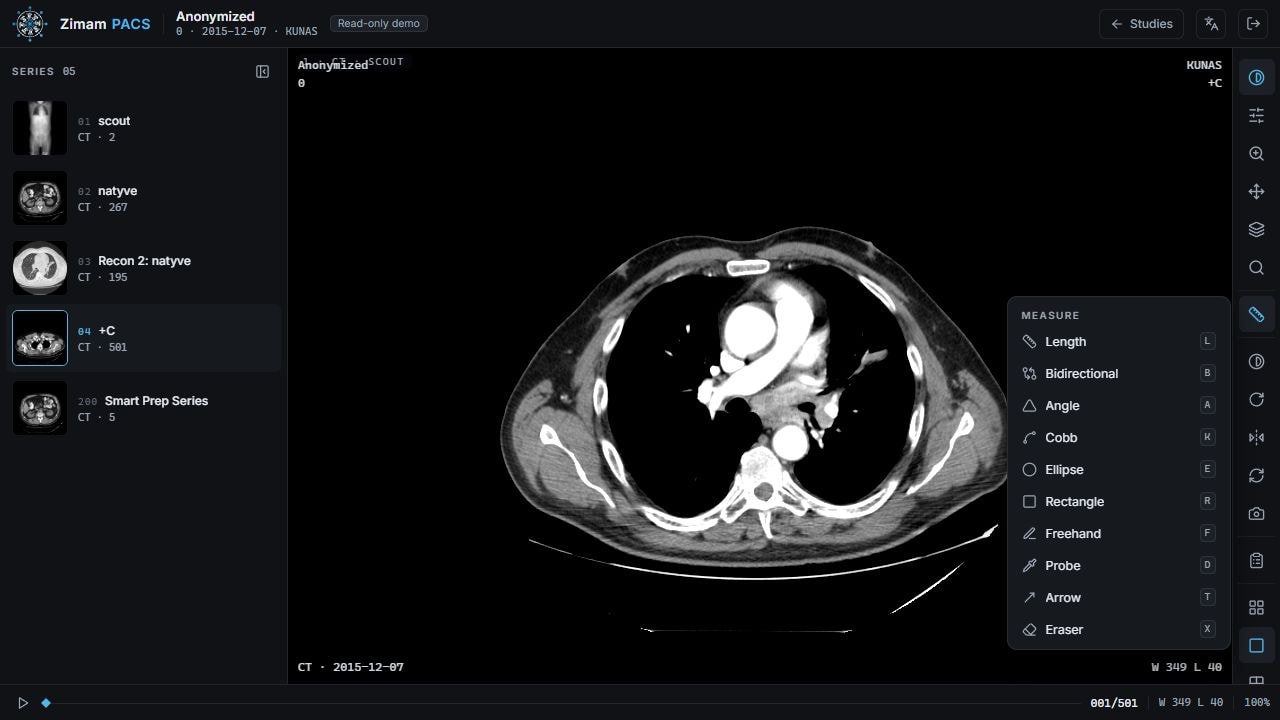
Search the worklist, compare available prior studies, record measurements, and prepare a report. Arabic and English interfaces support desktop and touch use; volume views need a capable browser and device.

Zimam PACS viewing an anonymized CT slice with its measurement tools visible.
Review slices with window and level controls, measurement tools, annotations, and series navigation.

Built into the current PACS

01

Zero-footprint viewer

Open the viewer in a supported browser without installing a desktop imaging application.

02

Arabic and English interfaces

A responsive interface with right-to-left layouts, keyboard commands, and controls for desktop and touch screens.

03

Client-side window-leveling

Adjust window and level, use modality presets, and inspect pixel values while viewing a study.

04

Touch navigation

Pan, pinch to zoom, scroll slices, move MPR crosshairs, and rotate 3D views with touch controls.

05

3D in the browser

MPR with oblique tilt, 3D volume rendering, and MIP / MinIP projections for suitable series.

06

Measurements and reporting

Measure lengths, angles, and regions of interest. Reports support drafts, signing, amendments, and version history.

Technical capabilities

  • DICOM C-ECHO, C-STORE, C-FIND, and C-MOVE for registered devices
  • DICOMweb query, retrieval, and storage: QIDO-RS, WADO-RS, STOW-RS
  • SQL-indexed archive with object storage and Arabic patient names
  • Lossless HTJ2K optimization, compressed-frame delivery, and thumbnails
  • Browser import of DICOM files, ZIP archives, and folders with permission checks
  • Patient-linked desktop import through AlSahl.Server
  • Resumable migration from legacy LEADTOOLS archives
  • User permissions and study links with expiry and revocation controls
  • Archive audit, repair, and background optimization in Server Manager
  • Selected study publication to Zimam Health when enabled
Clinical tools

  • Window / level presets, pan, zoom, magnify, invert, rotate, and flip
  • Stack navigation, cine playback, and multiple viewport layouts
  • Length, bidirectional, angle, and Cobb angle measurements
  • Ellipse, rectangle, and freehand regions of interest; pixel / HU probe
  • Arrow annotations, measurement panel, and PNG capture
  • Prior-study history and side-by-side comparison when permitted
  • Report drafts, final signing, amendments, and version history
  • Read-only or reporting-enabled links for selected studies
  • Permission-controlled de-identified DICOM export; pixel review remains necessary

Explore the volume

Use linked reconstruction views and 3D controls to explore suitable volumetric studies. Registered fusion requires matching DICOM frame-of-reference metadata.

  • Linked axial, sagittal, and coronal MPR with crosshair navigation and oblique tilt
  • MIP and MinIP with selectable plane, slab thickness, and full-volume projection
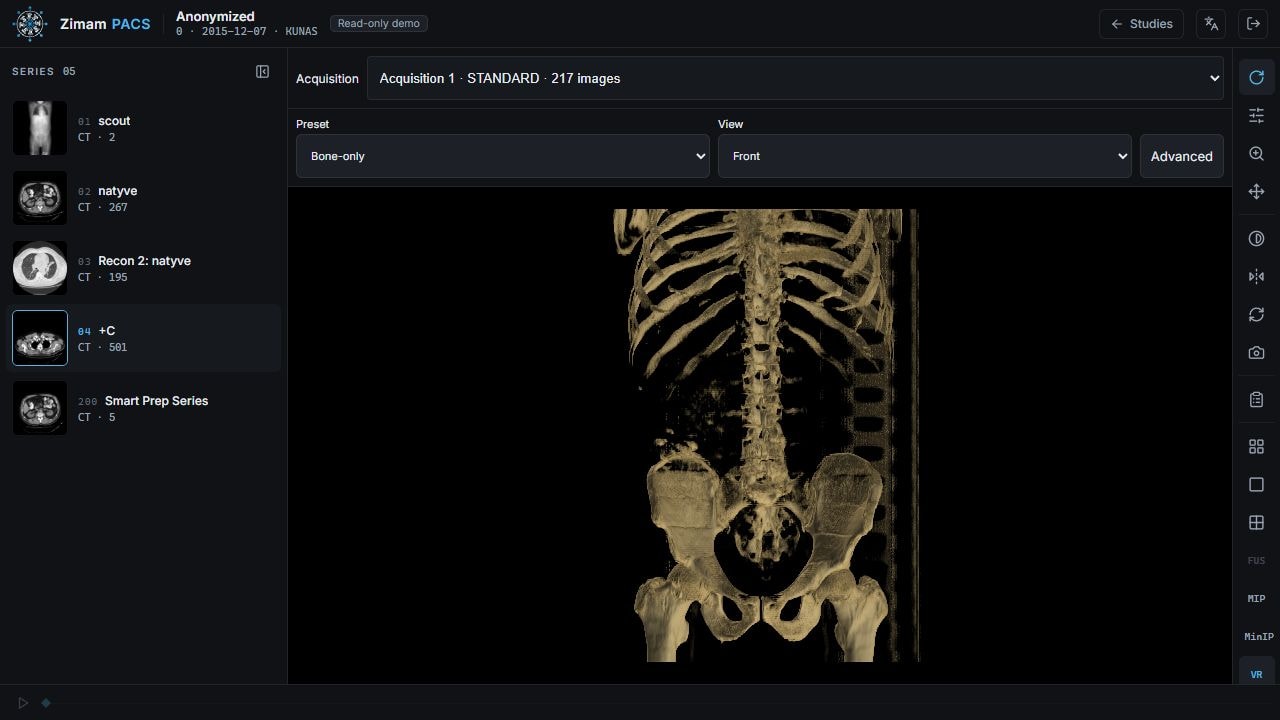
  • 3D presets, standard patient views, opacity, shading, and rendering-quality controls
  • Bone threshold and color controls, with patient-space cropping
  • Registered PET/CT and SPECT/CT overlays with color, opacity, and threshold controls
  • Mouse and touch orbit, zoom, and pan; adaptive interaction resolution
Zimam PACS showing a 3D bone volume with rendering preset and patient view controls.
Choose a rendering preset and patient view, then rotate the volume or adjust opacity, shading, and cropping.

Imaging that fits your workflow.

Talk to us about a deployment that fits your network, your existing modalities, and your reading workflow.